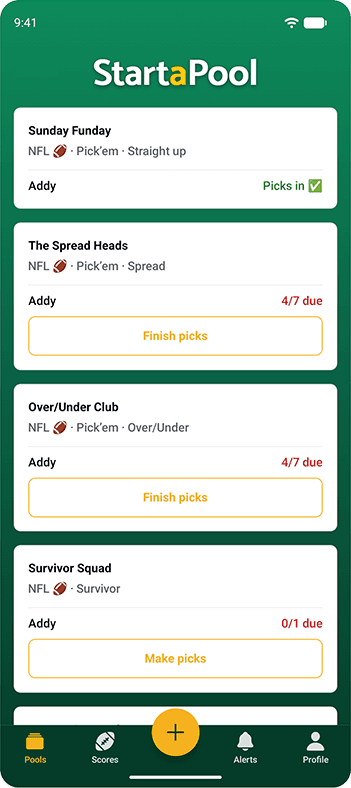
Pools List
Every pool you’re in, on one screen. Each one shows its sport, format and picking mode, then lists your entries underneath with the only thing you actually need to know before kickoff — whether your picks are in.
- All of your pools and entries in one list
- Picks in or a running count of what’s still due
- One tap from the list to the week’s picks
Anything unfinished gets a button that drops you straight into the picker for that entry, that week — no hunting through menus. Run one pool or eight and this is still the only page you need to check on a Sunday morning. Pools you’ve put away stay tucked behind a link instead of cluttering the list.
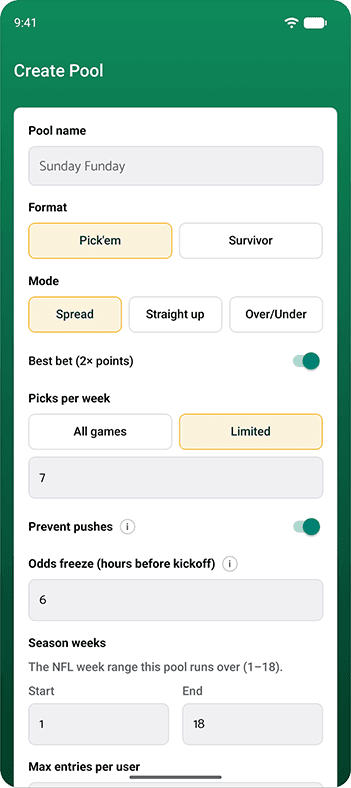
Create a Pool
One short form stands between you and a running pool. Name it, choose a format, choose how picks are graded and you’re done — every other field already has a sensible default, so you can change nothing at all and still end up with a pool that works.
- Pick ’em or survivor
- Spread, straight up or over/under
- Any stretch of the season, from week 1 to week 18
The rules people usually argue about are just settings here: whether a best bet counts double, how many games each participant picks per week, whether a result can land dead on the line, how many hours before kickoff the odds freeze, and how many entries one person is allowed to hold. Survivor pools get the extra choice that matters most — your pick has to win, or, if you flip it around, your pick has to lose.
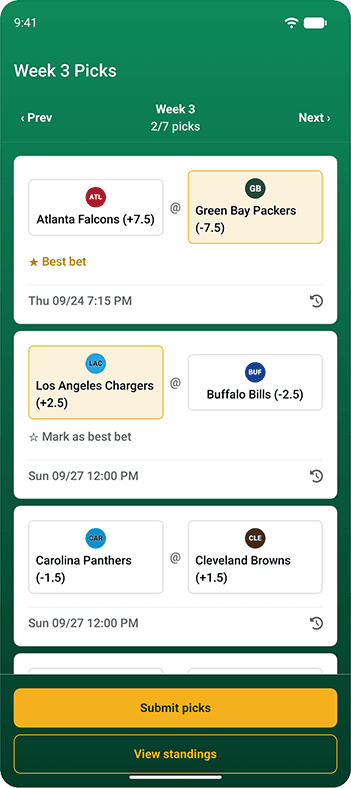
Format: Pick ’em
The classic, and the one nobody needs the rules explained to. Everyone picks from the same slate of games each week, a correct pick is a point, and the most points at the end of the season wins. Nobody ever gets knocked out, so a terrible week costs you the lead rather than the season.
- Everyone picks the same games each week
- Against the spread, or straight up if you’d rather keep it simple
- Points accumulate all season long
Decide whether participants pick every game on the slate or a fixed handful — seven against the spread with a best bet is the setup we call a Super 7, and it’s the one most pools land on. Nominate one pick a week as your best bet and it’s worth double, which keeps a runaway leader catchable and gives everyone something to argue about on the board.
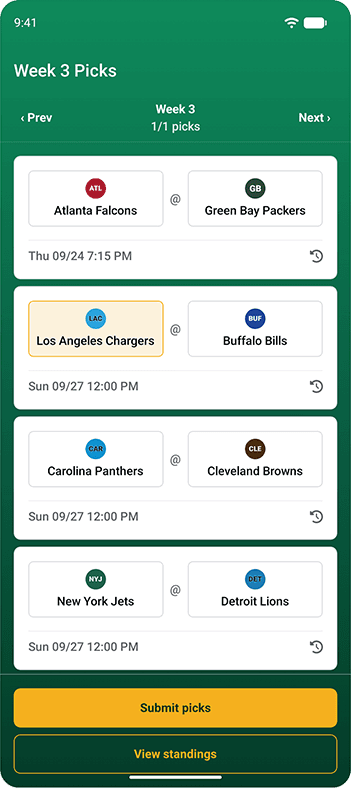
Format: Survivor/Reverse Survivor
One pick a week, straight up, no spread to think about. Get it right and you live to the next week. Get it wrong and you’re out — which is why the whole pool ends up watching a game none of them care about, praying a team they never heard of holds on.
- One pick a week, and that’s the whole week
- Straight up — the point spread never enters into it
- Reverse survivor flips it: back a team to lose
Reverse survivor is the same pool upside down. Your pick has to lose for you to survive, which turns the bottom of the standings into the interesting half of the schedule and makes a blowout something to cheer for. Pick a side when you create the pool — your pick must win, or your pick must lose — and the scoreboard tracks who’s still standing rather than who has the most points.
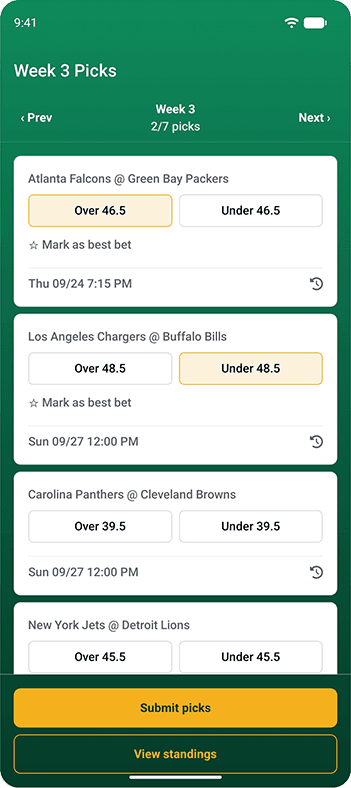
Format: Over/Under
A pool where picking the winner is beside the point. Each game shows its total and you take one side of it — over or under — with nothing but the two scores added together at the end deciding whether you were right.
- Over or under on each game’s combined points
- Who wins doesn’t matter at all
- Same scoring and same scoreboard as pick ’em
Totals come from the sportsbook consensus and freeze a set number of hours before kickoff, so everyone in the pool is graded against the same number regardless of when they got their picks in. Leave push protection on and every total carries a half point, which means a game can never land exactly on the line and take the pick away from everybody.
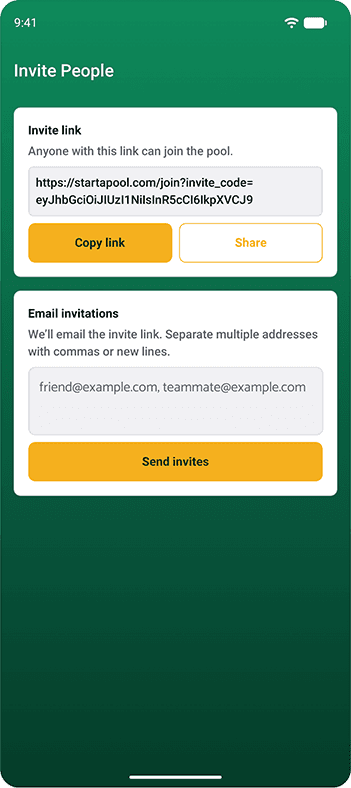
Invite People
Getting everyone in is the part that usually kills a pool before it starts. So there are two ways to do it and neither one leaves you keeping a list: share a join link, or hand us the email addresses and we’ll send the invitations for you.
- A join link you can paste anywhere
- Email invites, up to 50 addresses at a time
- No roster for you to build or maintain
Drop the link in the group chat, the family thread or a company-wide email and anyone who taps it can join. If you’d rather send invitations directly, paste addresses separated by commas or new lines and hit send — anything that fails stays in the box so you can fix a typo instead of starting the whole batch over.
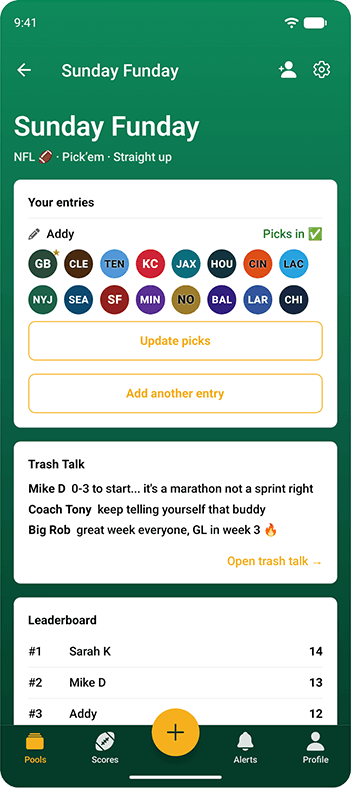
Pool Lobby
The lobby is your pool’s front page. Your entries sit at the top with this week’s picks shown as a row of team marks, so you can tell at a glance what you took and what you still owe — and the two things everyone actually opens the app for are waiting right underneath.
- Your entries and this week’s picks
- The latest few messages from the board
- The current leaderboard
Update picks from here for as long as the games haven’t started, or add another entry if the pool allows more than one each. If you created the pool, the invite and settings controls sit in the same header, so adding people or adjusting the rules never means going somewhere else.
Game Picker
Tap a team. That’s the entire interaction. Every game in the week is a card carrying both sides, the number each side is graded against and the kickoff time, and a counter at the top tracks how many of your picks are in so you always know when you’re finished.
- One tap per game, on any device
- Star a game as your best bet and it counts double
- Change your mind right up until that game kicks off
Any card can expand to show how its line has moved since it opened, so you can see whether the money has come in on one side before you commit. Move between weeks with the arrows at the top, submit when you’re done, and jump straight to the standings from the same screen.
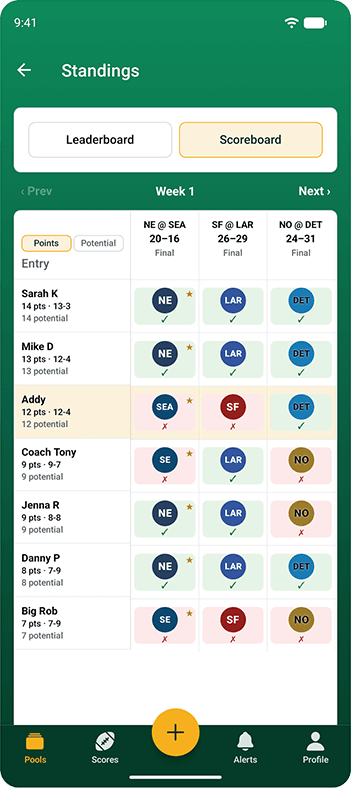
Weekly Scoreboard
One grid, the whole week: every entry down the side, every game across the top and each person’s pick sitting in the box where they meet. Right and wrong are colour-coded, best bets are starred and your own row is highlighted, so you can find yourself without reading a thing.
- Everyone’s picks, game by game
- Live grading while the games are still being played
- Potential points if every open game goes your way
Picks are graded as the scores come in rather than after the fact, so the scoreboard tells you who is ahead at four o’clock on a Sunday, not who was ahead on Thursday. Sort it by season total, by this week, by potential or by name — and flip over to the leaderboard whenever you want the season-long view instead.
Trash Talk
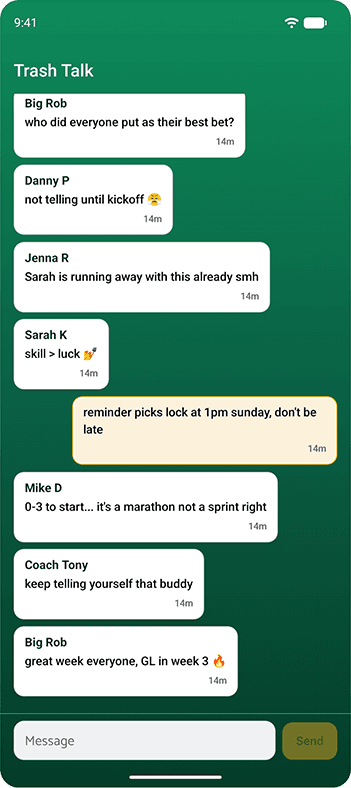
The picks are the excuse; this is the actual point. Every pool gets its own message board, open to everyone in it, for the bragging, the excuses, the reminder that picks lock at one o’clock and the running commentary on whoever started 0–3.
- One running board per pool
- New messages arrive without a refresh
- Delete your own posts — admins can moderate anyone’s
The latest few messages surface on the pool lobby, so nobody has to go looking to find out something happened. It reads the same on a phone, a laptop or a desktop, which means the conversation carries on all afternoon no matter what everyone is watching the games on.
Scores
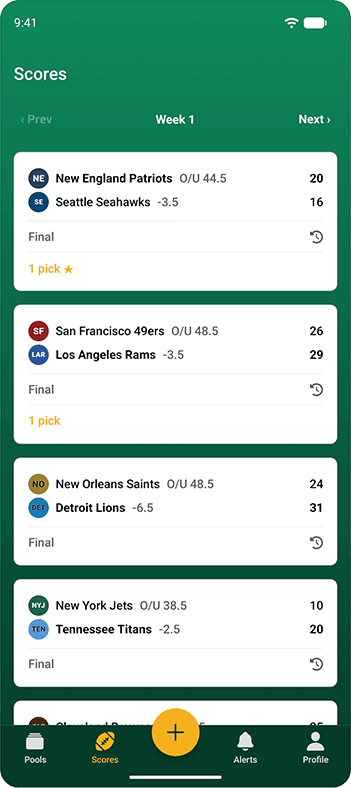
Every game in the week with the score, the spread and the total on one line — and, attached to each one, how much of it you have riding. A game you have no interest in is just a score. A game three of your entries are sitting on says so.
- Every game, every week, with the line and the total
- Your picks across all of your pools, grouped by game
- Open to anyone, signed in or not
Expand a game and you’ll see exactly which pools and entries have it, with best bets flagged, so one glance answers the question you’d otherwise be opening four pools to work out. Each game carries its line history too, which makes it easy to see how far a number travelled before it froze.
Does that sound like something you might be interested in?